
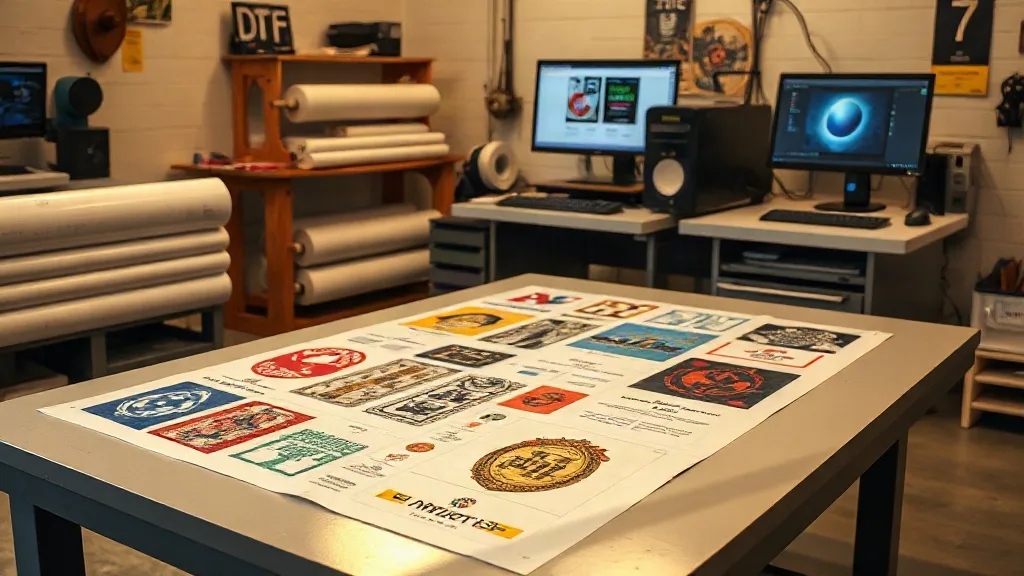
Every print shop owner knows the sting of a wasted transfer sheet. You order a batch of DTF transfers, press a few jobs, and then realize half the sheet is empty white space. That's money literally going in the trash. A DTF Gangsheet solves this problem by letting you combine multiple designs onto a single sheet, but only if you order it strategically. This guide isn't about basic gangsheet definitions. It's about the ordering decisions that separate profitable shops from ones that constantly bleed cash on unused film. We'll cover how to plan your sheet like a production schedule, size designs for real-world garments, and avoid the hidden traps that eat into your margins.
Why Your Gangsheet Ordering Strategy Matters More Than Your Press
You can have the best heat press on the market, but if your gangsheet is laid out poorly, your profit margin suffers. The gangsheet is the foundation of your DTF workflow. Order too few designs and you pay for unused space. Order too many and you risk outdated inventory or design fatigue. The goal is to treat each gangsheet like a mini production run: every square inch should have a purpose. Shops that master this see lower per-unit costs, faster turnaround times, and less material waste. It's not about squeezing every last centimeter; it's about aligning your sheet with actual sales data and upcoming orders.
Planning Your Gangsheet Around Real Demand
Before you open your design software, look at your sales history. Which designs are consistent sellers? Which are seasonal? A common mistake is to fill a gangsheet with a new design you hope will be popular, only to be stuck with dozens of transfers you can't move. Instead, anchor your sheet with proven bestsellers. Allocate about 60-70% of the sheet to these reliable designs, and use the remaining space for new or limited-edition prints. This way, you cover your base demand while still testing new ideas. If you run a pre-order model, you can even wait until you have a minimum number of orders for a design before adding it to the sheet. That's smart ordering: letting demand dictate supply, not the other way around.
Using Sales Data to Size Your Runs
Pull your sales reports and calculate the average monthly sales for each design. If a design sells 50 units per month, you might order 60 transfers to cover a six-week period. But remember that gangsheets are priced by the sheet, not per design. So if you have ten designs that each sell 50 units, you could fit all ten on one sheet if the sizes allow. The key is to balance the quantity of each design with the available space. Don't force a low-selling design onto the sheet just to fill space; leave that area for a higher-demand design or a new test. The goal is to maximize the number of sellable transfers per sheet, not just fill it up.
Layout Tactics That Cut Waste and Speed Up Pressing
How you arrange designs on the gangsheet affects both material waste and pressing efficiency. Group similar sizes together. For example, place all small chest logos in one area and large back prints in another. This makes it easier to cut them apart and reduces the risk of accidentally pressing the wrong size. Also, consider the orientation of the designs. Rotating a design to fit better can save inches of film. But be careful: if a design has text, rotating it might make it harder to read during pressing, leading to mistakes. Always keep the most frequently pressed designs near the edge of the sheet for quick access. And leave a small gap between designs (about 0.5 cm) to make cutting easier and prevent ink from bleeding between prints.
Nesting Designs for Maximum Yield
Nesting is the art of fitting irregular shapes together like puzzle pieces. If you have designs with curved edges or varying widths, try to interlock them. For instance, a circular logo can nestle into the curve of a crescent-shaped design. Most RIP software includes nesting tools, but manual adjustment often yields better results. Spend a few extra minutes experimenting with placement; the savings in film can be significant. A well-nested sheet can hold 10-15% more designs than a simple grid layout. Over hundreds of sheets, that adds up to real money.
Choosing the Right Sheet Size for Your Shop
Gangsheets come in various widths, typically matching the film roll size your printer uses. Common widths are 13, 17, 22, and 24 inches. The length is usually customizable up to a maximum. Your choice should depend on your typical order volume and the size of your heat press. If you have a 16x20 press, you can't press a design larger than that, so there's no point ordering a 24-inch wide sheet with designs that exceed your press area. Also, consider your storage space. Larger sheets are more cost-effective per square inch but require careful handling to avoid creasing. For most small to medium shops, a 22-inch wide sheet offers a good balance between capacity and manageability.
Matching Sheet Size to Press and Garment
Measure the largest design you regularly press. Add a couple of inches for margin. That's the minimum sheet width you need. But also think about garment sizes. If you print a lot of youth sizes, you'll have many small designs; a narrower sheet might be more efficient because you can fill it with more small items without wasting wide margins. Conversely, if you specialize in oversized back prints, you'll need a wider sheet. Don't fall into the trap of always ordering the biggest sheet; sometimes a smaller sheet with a tighter layout is more economical.
Avoiding the Most Common Gangsheet Ordering Mistakes
Even experienced shops make these errors. First, ordering the same design in multiple sizes without checking actual demand. You might end up with a surplus of small sizes that nobody orders. Second, ignoring the grain of the film. DTF film has a slight directional grain; if you rotate designs 90 degrees, you might affect ink adhesion. Always test a small batch first. Third, forgetting to account for cutting tolerance. If your designs are too close together, you'll struggle to cut them cleanly, leading to wasted transfers. Leave enough space. Finally, not updating your gangsheet regularly. Trends change; what sold last year might not sell now. Review your sheet composition monthly and adjust based on current sales.
How to Calculate Cost per Transfer on a Gangsheet
To truly understand your savings, calculate the cost per transfer. Divide the total cost of the gangsheet (including shipping) by the number of usable transfers. Compare that to ordering individual transfers. You'll likely see a significant reduction. But don't stop there: factor in your labor for cutting and weeding. A sheet with many small designs might take longer to cut, increasing labor costs. So, while the material cost per transfer is lower, the labor per transfer might be higher. Find the sweet spot where both material and labor costs are minimized. For many shops, that means a mix of medium-sized designs that are quick to cut and press.
Frequently Asked Questions About DTF Gangsheet Ordering
Can I mix different designs with different sizes on one gangsheet?
Absolutely. In fact, that's one of the main advantages. You can combine small chest logos, medium sleeve prints, and large back designs on the same sheet. Just ensure the layout is efficient and allows for easy cutting. Most gangsheet providers allow you to upload multiple files and arrange them however you like.
How do I determine the best sheet length for my needs?
Sheet length is usually limited by the provider's maximum (often 100 inches or more). The ideal length depends on your order volume. If you have a large batch of identical designs, a longer sheet reduces per-unit cost. For mixed orders, a shorter sheet might be more manageable. Start with a length that covers one to two weeks of production and adjust as you track your usage.
What file format should I use for gangsheet designs?
Most providers require PNG files with transparent backgrounds at 300 DPI. Some accept PDF or TIFF. Always check the provider's guidelines. Ensure your designs are sized correctly; don't rely on the provider to resize them, as that can lead to quality loss. Include a bleed if your design has a background.
How often should I update my gangsheet designs?
Review your gangsheet composition monthly. Discontinue designs that haven't sold in 60 days and replace them with new tests or proven seasonal items. This keeps your inventory fresh and reduces dead stock. If you have a loyalty program or subscription, you might update more frequently to keep offerings exciting.
Is it cheaper to order a gangsheet or individual transfers?
For most shops, gangsheets are significantly cheaper per transfer because you're paying for the sheet area rather than per design. However, if you only need a few transfers of a single design, individual ordering might be more cost-effective. Calculate both options based on your volume.